
Ransomware, and the backup that survives it
The outcome of a ransomware attack is usually decided weeks beforehand, by how your backups are arranged. Here is how to arrange them so the worst case is an inconvenience.
Ransomware is the one category where the outcome is decided before the attack, by a decision you made weeks earlier about backups. Everything else is mitigation. This guide covers how an attack typically unfolds on a home or small-business machine, and how to arrange storage so that the worst case is an annoying afternoon rather than a catastrophe.
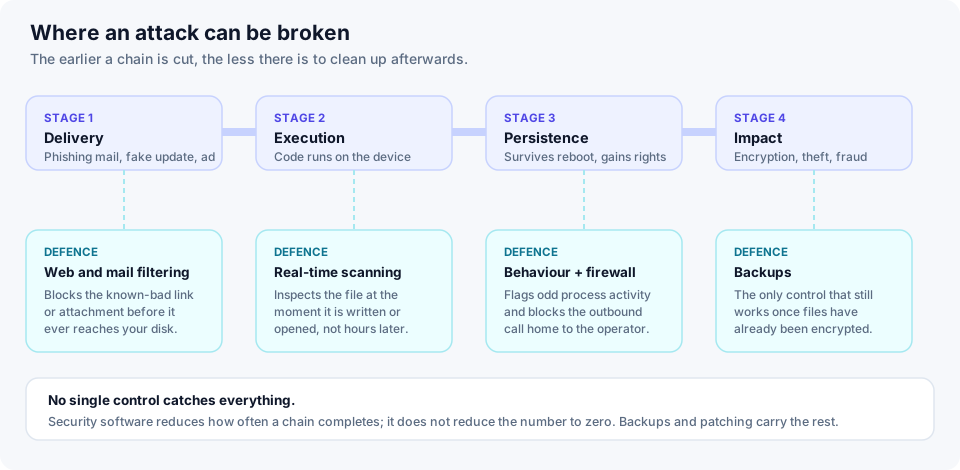
How an attack unfolds
Delivery. Something arrives: an attachment, a link, a cracked application, a fake update prompt, or an advertisement impersonating a real software download. On business networks, an exposed remote-access service with a weak password is a common route.
Execution. Code runs. Often what runs first is small — a loader whose only job is to fetch the real payload, which keeps the initial file uninteresting to scanners.
Preparation. Before anything is encrypted, the payload usually tries to make recovery harder: deleting Windows shadow copies, stopping backup services and database services so their files can be locked, and enumerating every drive and network share the account can write to. Many groups also copy data out at this stage, so they can threaten publication as well as withhold the key.
Encryption. Then it runs, usually fast, usually targeting documents, images, archives and databases while leaving the operating system working so you can read the ransom note.
Why a connected drive is not a backup
This is the single most common and most expensive misunderstanding.
Ransomware encrypts everything the compromised account can write to. An external drive that is permanently plugged in and mounted is exactly that. So is a mapped network share. So, in a slightly different way, is a continuously synchronised cloud folder: the sync client sees the encrypted files, decides they are the newest version, and faithfully uploads them.
A copy only survives if the attacker cannot reach it — because it is physically disconnected, or because the service keeps versions the client is not allowed to overwrite or delete.
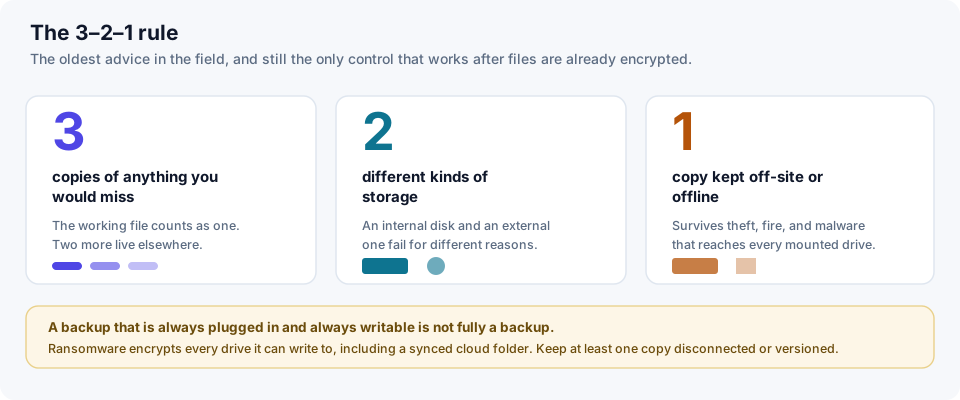
Building the 3–2–1 arrangement
- Three copies. The working files on your machine count as one. Two more exist elsewhere.
- Two kinds of storage. An internal disk and an external disk, or a local disk and a cloud service. Different media fail for different reasons and at different times.
- One out of reach. Off-site against fire and theft, and offline or version-protected against malware.
For most households this is genuinely achievable with two things: an external drive that you plug in once a week, run a backup to, and then unplug; plus a cloud service with file versioning and a retention window measured in weeks rather than days. Between them you have covered hardware failure, theft, accidental deletion and encryption.
The step people skip
Test a restore. An untested backup is a belief, not a backup. Once, pick a folder you care about, restore it somewhere else, and open the files. Repeat about once a year. The number of backup arrangements that turn out to have been silently failing for months is remarkable, and the moment you find out should not be the morning of the incident.
If it happens anyway
- Disconnect the machine from the network, including Wi-Fi, to stop it reaching shares and other devices.
- Do not plug in your backup drive until the machine is known clean or rebuilt.
- Photograph the ransom note. The identifiers in it are how a specific strain is recognised.
- Check whether a free decryptor exists. The No More Ransom project, run with Europol, publishes free tools for strains whose keys have been recovered or whose encryption was flawed.
- Report it to your national cybersecurity authority or police. In many countries this is a requirement for a business, and it is useful even for an individual.
- Rebuild rather than clean, where you can. Reinstall the operating system, then restore data from a copy you trust.
Law-enforcement agencies across the EU advise against paying. Payment funds the next round, and it buys a promise from a criminal: recovery after payment is frequently partial and sometimes does not happen at all. It is ultimately your decision, and one worth taking with professional advice rather than in the first hour of panic.
Related: how antivirus software actually works — in particular the section on behaviour monitoring, which is the layer that catches an encryption run in progress.